Alchemy 1.7 brings a set of 20 new elements (tot a total of 400), allows you to display a timer with the total elapsed play time and is available in French.
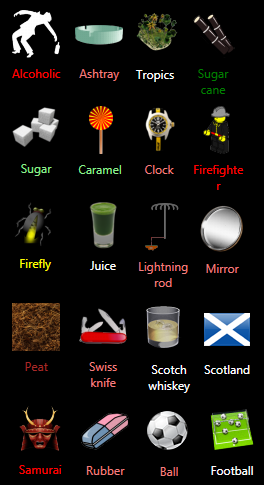
The 20 new elements are:
| Alcoholic | Mirror |
| Ashtray | Peat |
| Ball | Rubber |
| Caramel | Samurai |
| Clock | ScotchWhiskey |
| Firefighter | Scotland |
| Firefly | Sugar |
| Football | SugarCane |
| Juice | SwissArmyKnife |
| LightningRod | Tropics |
The complete list of elements is available here.
Starting with version 1.7 you can display the total elapsed time since the beginning of the game. This can be enabled from the Settings page (in the More window) by checking the Display Timer option. However, if you already played Alchemy, the timer will only show the time you spent starting with version 1.7. The timer is reset only when you reset the game progress and start from scratch.
In addition the game is now available in French. If you want to help translating Alchemy to your language, please drop a comment so I can contact you.
Download the latest game version from here.
I have a little problem, Marius. I have application problem. Do you know what to do, because i love this type of games?
Unless this is a spam which fooled me, the answer is no, I have no idea what you could do since you did not describe what the problem is.
Hello, Marius !
First of all, very nice game. I spent about 4 or 5 hours with it right after I downloaded it 🙂
At some point, being a little tired and stuff, I started to muck around in Settings, where I found the timer option.
The timer displays the correct number of hours and minutes … but only if they would have been displayed separately 🙂 … Right now, my timer says – 4:276:50
This is the only “major” bug since “testing” the game 😀 … if you’ll excuse me, I’ll head back to the game 😛
See ya & good luck !
Would it be possible that you send me the .aus file (with the user’s game progress) so that I can check what could be wrong? If so, drop another comment and I’ll send you an email.
Sure thing.
If I don’t answer fast enough, sorry. I’m slow by nature 😛
Thanks for helping, the problem with the timer is now fixed. Download the latest version (1.7.2) from here https://mariusbancila.ro/blog/games/alchemy/.
Only if there are new items to be found, because I finished the game (400/400) 🙂
Probably in a later release. 😉
Great game, need more elements 🙂
If you are interested, I could translate to Danish.
And I allso have a problem with the settings not working, it looks as if it tries to set it, but nothing changes, Combine only new is allways on, Tap to combine is allways off and Display timer is allways off, but if I look at the settings it looks as if they are all off…
Hello, Marius.
I’d like to report a bug. For some reason the energy element doesn’t want to react any of the elements, so I always get stuck…
Maybe it’s because I use Win 7. I have no clue.
I hope you can fix it soon!
Best wishes.
Reka
The game was developed on Win7, so no problem there. Maybe you don’t find the combinations. 😉 There are 8 elements that you can combine with Energy. Try for instance Ocean or Cloud. Just to prove it does combine. 😉
Egh… you were right… I’m sorry XD
The Alchemy Element wiki, has only 2 elements that combine with energy so far. If you know the rest, please add them.
Is there anywhere I can fond a cheat-sheet for this? I’m constantly getting stuck, which kinda ruins the fun of it. I know you have a list of all the elements, but do you have a list of how to create them anywhere?
No, there is no cheat-sheet for the combinations. I don’t plan to publish that. But if you know .NET, you can do some reflection on the DLL. Or you Red Gates’ Reflector to do that, and you’ll find the combinations. That’s the most I will say about that. 😉
Zombie2300, you can check out The Alchemy Element wiki to find, for now, some elements. You can also add combinations you find there too. The same goes for the many missing elements.
Very cool game, I also have it on my android, but playing it on a computer screen is more comfortable :-). Is there a way to remove all elements with one click from the combination screen? If you need help with German translation, let me know.
Yes, it’s possible to remove all the elements from the desktop area by double clicking the trash can. This is documented both in the game’s help (press the Help button) and on the game page https://mariusbancila.ro/blog/games/alchemy/. And yes, help translating to German is welcomed.
Thanks for the answer. Which files do I need to start with the translation into German? I dont know .NET to disassemble the program.
No need to know programming to translate Alchemy. It’s just some text files that you have to translate. Please drop a comment with a valid e-mail address (of course not in the comment text) so I can contact you. The one you used so far is not working, I got “Delivery to the following recipient failed permanently”.
I’m playing your alchemy game… however, I’d like to know if you have a list of all the possible combinations – not just a list of all the final outcomes.
As I already said about a week ago, no, there is no cheat-sheet with all the combinations. And I don’t plan to make it available. You have the Hint button that should help, and well, you can disassemble the game and find the combinations.
Marius please do as I say the element of “planet”because we’ve tried everything including + continent continent and does not work … my version is more current, this same topic
@raveno, you’re close to the answer. You need to combine Continent with something. Think about Earth. Continents account for only 30% of it.
wow nice… I came to find that the game was bug… ^^
I have some formal verification of the elements and combinations. So, if you can’t find an element, I assure you, there is a correct combination for it. Though, I agree that some are harder to find.
There may not be a complete cheat-sheet as of yet, but Alchemy Elements will hopefully become the requested sheet. But you better be prepared to give you’re share in the making of it, as I really do not wish to be doing this on my own.
@Koppa, thanks for the effort, but I hope you know that the complete list of elements is available here: http://www.mariusbancila.ro/games/alchemy/alchemyelements.txt.
Well, but I’m not just interested in the complete list of elements, but also in how to combine each of the elements. You, know…, the requested cheat-sheet.
Let me just add that Alchemy Elements wiki contains 110 elements from this implementation of Alchemy, and that all of them contains a partial “cheat-sheet” and can be checked out here.
Nice idea, although I haven’t yet found all combinations, I’d like to help translating alchemy in Italian, contact me if you’re interested.