I have played recently a great game on Android, called Alchemy, created by Andrey Zaikin. You start with four basic elements, Fire, Water, Air and Earth and you can combine them to get more and more elements. The game was so catching that after finishing it I decided to write my own version for Windows. I chose WPF because I wanted to learn it and because I realized the stuff I wanted to create was too hard to do in MFC. This is my first real application in WPF, and what you see is the result of 4 days of work; in MFC it could have been 4 months, I believe.
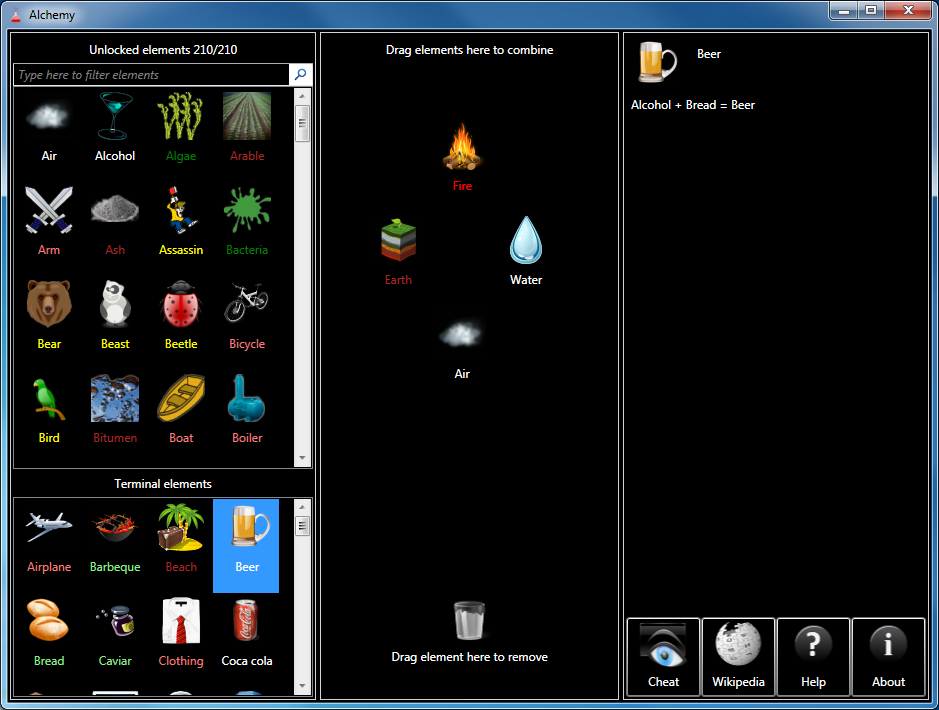
You start with the four basic elements: air, earth, fire and water. You can combine them by dragging onto each other on the central area of the window, “the desktop”. When new elements are created they are added to one of the two lists from the left area. The top list has elements that can be combined again. The bottom list contains terminal elements, i.e. elements that can no longer be combined. You can drag elements from the non-terminals list back to the desktop area, but not from the terminals list.
You can quickly bring onto the desktop the four basic elements by double clicking on an empty area of it. Double clicking on an element from the desktop creates a duplicate of it. You can remove an element from the desktop by dragging it over the trash can icon. You can remove all the elements from the desktop by double clicking on the trash can.
When the number of elements gets too big scrolling through the list might be cumbersome. You can use the search textbox to filter the elements in the list. As you type only the elements that contain the typed text are displayed. It you press the X button of the textbox or clear its content, the list displays again all the unlocked elements.

On the right area of the window you find a help pane. When you select an element from one of the two lists on the left side, you can see a list of all the unlocked combinations in which the elements appears (either as input or output).
There are also several buttons: Cheat, Wikipedia, Help and About. Button Cheat opens a new window that displays the list of all available elements. So if you get stuck and don’t know what elements are left to discover you can cheat and see the list.

Button Wikipedia starts a search on Wikipedia for the currently selected element. Buttons Help and About display information about the game.
Note that your game progress is saved when you close the game and loaded when you start again. The information is stored in a file with your Windows user name and extension .aus. Don’t delete the file or you lose your game progress.
Here is the alphabetical list of all the 210 elements available in version 1.0:
| Air | Cochineal | Gunpowder | Ozone | Soldier |
| Airplane | Coffin | Hippopotamus | Panda | Star |
| Alcohol | Combustion engine | Hourglass | Paper | Starfish |
| Algae | Computer | House | Pearl | Steam |
| Arable | Concrete | Hunter | Penguin | Steam engine |
| Arm | Continent | Hut | Penicillin | Steamer |
| Ash | Corpse | Hydrogen | Perfume | Stone |
| Assassin | Country | Ice | Petroleum | Storm |
| Bacteria | Darth Vader | Jedi | Pie | Sulfur |
| Barbeque | Desert | Kerogen | Pinocchio | Sun |
| Beach | Diamond | Knife | Pizza | Swamp |
| Bear | Dinosaur | Lava | Planet | Tequila |
| Beast | Dough | Library | Plankton | The Beatles |
| Beer | Dragon | Lichen | Plesiosaur | Thunderstorm |
| Beetle | Dragonfly | Life | Poison | Tiger |
| Bicycle | Dust | Light | Poisoned weapon | Time |
| Bird | Earth | Lightbulb | Polar Bear | Tom and Jerry |
| Bitumen | Egg | Lightsaber | Pressure | Tool |
| Boat | Electricity | Lime | Pterosaur | Tornado |
| Boiler | Energy | Limestone | Radar | Tortoise |
| Book | Fern | Livestock | Radio | Transistor |
| Bread | Fire | Lizard | Rain | Tree |
| Brick | Firearm | Locomotive | Rainbow | Turtle |
| Butterfly | Fish | Man | Sand | Uncut diamond |
| Cactus | Fisherman | Manure | Santa claus | Universe |
| Car | Flour | Meat | Scarab | Vodka |
| Carbon dioxide | Flower | Metal | Scientist | Volcano |
| Carmine | Flu | Milk | Scissors | Wagon |
| Cat | Fly | Mite | Scorpion | Warrior |
| Caviar | Fondue | Mold | Seed | Water |
| Cement | Forest | Monkey | Shark | Watermelon |
| Cheese | Fossil | Moon | Shell | Whale |
| Chicken | Fruit | Moss | Silicon | Wheat |
| Chip | Fugu | Motorboat | Sith | Wheel |
| Christmas tree | Galaxy | Motorcycle | Sky | Wind |
| City | Gasoline | Mouse | Skyscraper | Wine |
| Clay | Geyser | Mud | Snail | Wood |
| Cloth | Ghost | Mushroom | Snake | Wooden ship |
| Clothing | Glass | Ocean | Snow | Wool |
| Cloud | Grape | Old man | Snowman | Worm |
| Coal | Grass | Omelette | Soda water | Yeast |
| Coca cola | Grove | Oxygen | Solar system | Yogurt |
Note: In order to run the game you need .NET framework 3.5 SP1.
Stay tuned, updates with more elements are coming!
Update: Download the latest version from here.
Hi, I spent several hours in playing your alchemy-game and im almost finished. The only things missing ere “time” and “planet” (which would lead to solar system i assume) and “santa clause”. Are you shure that these alements can be produced at all?
Anyway, thanks for making this wonderful game availiable on windows – i loved to play it.
Yes, I double checked it for you and Time, Planet, Solar System, Santa Claus, all can be achieved. All of them are quite logical. Maybe time is a little bit harder, but if you want I can give you hints. 😉
Stay tuned, an update with lots of cool elements is coming. As a sneak peak, there will be Pharaoh, Anubis, Robin Hood, Captain Nemo, Vampire, Batman, Twilight Saga, Jungle Book and others.
Very well done..
but I just couldn’t resist:
var assembly = Assembly.GetAssembly(typeof(Alchemy.AlchemyCombination));
var type = assembly.GetType(“Alchemy.AlchemyCombinations”);
var property = type.GetProperty(“Combinations”);
var getMethod = property.GetGetMethod();
AlchemyCombination[] combinations = (AlchemyCombination[]) getMethod.Invoke(null, null);
using(TextWriter writer = new StreamWriter(“cheat.txt”))
{
foreach (AlchemyCombination combi in combinations.OrderBy(x => x.InputElement1.Name))
{
Console.WriteLine(combi);
writer.WriteLine(combi);
}
}
oh and *** Spoiler alert *** on that previous comment.
and again: well done, thanks!
Anyone with a little knowledge about .NET and reflection can do that, of course. The idea would be to try to find the combinations yourself. 😉
There is a bug with the Bread element. It is defined as terminal, but as you can see in the picture it is used to create another (terminal) element. An update will be released soon with this problem fixed.
Thanks for clearifying that all of the elements can be done. Finally I found out what combinations are neede for the last ones an dim finished now. I can’t wait for new elements to come 🙂
Sorry Peter, I was wrong. There is a bug in the program. 3 elements, Bread, Hourglass and Snow are defined as terminals but they are needed to make other elements. I have fixed this and will release an update soon with 50 more elements.
Latest version with 50 new elements and bugs fixed is available here https://mariusbancila.ro/blog/2010/09/25/alchemy-update-50-new-elements/.
Great game.. but is there any cheats with the combinations.
No, there are no cheats for combinations, only the list of all available elements. But you can see Thijs’ approach (see above), if you are familiar with .NET.
Hello. I’ve found about 120 elements but I’m missing the most important one : “Man”. Could you give me some hints about obtaining it? I’m quite confused and I tried a lot of combinations.
I suggest you download the latest version (currently 1.3) and try the new feature, Hints. If still not able to make it, I’ll give you hints. There is the link to the latest download https://mariusbancila.ro/blog/games/alchemy/
The new version is far more better. The “Hints” button is excellent. But, this means I have to start again from zero, right? I can’t use the old saves from 1.2 on 1.3, right?
Also, I’d like a hint about how to create “Men” on the 1.2 Alchemy. Thank you very much for your time and for this awesome game.
No, no, you can use the old saves. You don’t have to start from scratch. Just keep the user file with the extension .aus (having the name of your Windows account) and you’re all set. All you have to do is replace the executable.
Hi. I absolutly love this game but I cant save my progress which is slightly annoying and I also cant see the bottom part – hint, cheat etc once i get a certain amount of elements. Please help 🙂
The game does not work on notebooks. It requires a minimum resolution that is larger than the one you have on a notebook. I know what you are describing, I tried it on an EEE PC. Maybe in the future I will make changes so that it works on smaller resolution, but I don’t consider it a priority.
As for saving it should work. Just don’t run directly it from the zip archive. Progress is saved in a file having your windows account name and extension .aus.
Hi, it would be great if you could add an option to NOT combine already combined elements. It is just annoying to drop water over fire by mistake get steam and have to replace the elements again… One cannot remember all the combinations tested already. This option is in the android version of the game.
Thanks …
Yes, I put this feature on the TODO list.
We desperately need rubberband selection of elements, as well as (possibly) an “add all” button. Though I would prefer being able to select multiple elements via the normal Windows methods.
Hi I love your game, but am having problems updating. When I try I’m told that the zipped file is empty. What am I doing wrong I can’t wait to be able and try to make the new elements. Help
The latest version of the game is always available here: https://mariusbancila.ro/blog/games/alchemy/. Please make sure your browser cache does not influence the download. I had problems because of the cache, the browser didn’t download the latest version. But in any version, the zip archive was not empty. So your downloaded file might be corrupted some how. Maybe try with another browser.
Dear Marius!
I’ve downloaded your Alchemy for Windows app and really liked it. I’d like to ask you if you could make a Hungarian language “addon”? I can send you the translation if it helps. 🙂
Yes, adding Hungarian is possible, all I need is help from someone speaking Hungarian to translate the files. Looks like you’re willing to help so I’ll drop you an email.
I installed the most recent version of the .net framework, and i keep getting the following error message “To run this application, you must first install one of the following versions of the .net framework: v2.0.50727”. Why is this happening, and how do i remedy it? If it helps, i’m currently running XP SP3. Also, when i click on “Yes” to install the .net framework, it takes me to the page of the version i already have.
Try deleting the app.config file and see if you still get the same error.
now it says it can’t find a version of the runtime. is it possible there was a problem with the installation of .net?
re-installed .net and still getting the same messages
never mind, it works if i install .net 3.5 instead of .net 4 🙂
Hi can you please give me a hint? How do I make Pharahon? Pyramid + …..?
You have the hints features in the game? Why don’t you use that? If you don’t have the latest version, you can download it from here: https://mariusbancila.ro/blog/games/alchemy/. If still not helpful, yes, I can give you hints. 😉
I tried hint feature but i just can’t do it….Pharaon is Pyramid + something but i can’t find it….I’ll be very happy if you’ll help me with that element.
A pharaoh is a…
Can I used this on Windows Mobile if I have .NET 3.5 installed on it? I have 480 x 800 WVGA resolution.
Also, I have found 140/400, but for the life of me I can’t get alcohol!! My husband keeps laughing at me because that was one of the first things he got on his Android and that combination doesn’t work here.
Thanks. I am loving this 🙂
I’m sorry but the game that does work at such small resolutions. Never tried it on a Windows Mobile, but probably a important part of the window will not be visible.
As for alcohol, it’s not that hard. However, is not the same combination as on Android. You can use the Hints feature.
Thanks!
A suggestion if I may. I’ve long since completed all 400 elements, but I doubt I’ve found every combination to form them. Could you add an Unlocked Combinations indicator, and perhaps expand hints to aid in a true 100% score?
Ive downloaded this game, its brilliant! my only problem is when i close it out it deletes my game progress. Ive made numerous attempts to even double save it..ive gotten to 245 elements…ugh..and have to start over..
You must not put it in Program Files, because it won’t be able to save the progress there, and you must not run it directly from the zip archive. You can also save and load to/from any file, if you press the More button and then use the Save and Load options.
Hello, I was wondering, since I’ve seen versions of this game on iOS, Android, and now Windows, all with the same concept and similar or the same graphics & combinations: Is the concept for the game open-source? I would like the opportunity to port this excellent puzzle game to the webOS platform, but want to know what sort of legal hurdles there may be first. If possible could you email me with any information you have? Thanks.
You should make this game as an app for the iPhone or iPod touch. That would be awesome because I can’t find any versions that come close to this or the android version. This game is wonderful and addictive! Great job!
@Jennifer, sorry to disappoint, but I don’t have neither the time nor the knowledge to develop a version of the game for iPhone/iPad. But maybe there is someone willing to do that. It’s not that hard after all.
@FordPerfect, I don’t know of anybody holding copyrights for the concept of the game. If there is someone, then I might have a problem myself. So I’d say you’re completely free to develop a version for another (or actually any) platform.
Just a note: Cochineals and Coccinellidaes are quite different insects. I see you’re using the latter to depict the former, but cochineals aren’t ladybugs.
Thanks for pointing that out. I agree that not all the images are the best pick. However, the hardest part of the implementation was to find the appropriate images and adjust them if necessary. So it’s likely that some elements can be better depicted with other images.
Me and my children love your game. How can we suggest new combination?
Such as “turtle+weapon=roman legion” ?
and “roman legion + gunpowder = infantry”
“infantry + engine = tank”
and so on?
I’m glad you like the game and any kind of suggestions, including combinations, are always welcomed. As for combination suggestions, the only way you can do it right now is by dropping a comment here on my blog. The combinations you suggested are good and I’ll consider them for a next release when new elements will be available. The only problem is that the game already has 400 elements, which is quite many in my opinion, so I have to be selective and not release lot of new elements, otherwise people will get bored, I believe.
as you wish, anyway we prepared literally tons of suitable items. Maybe it’s better if I send you an email (also to prevent sharing hints…)
Yes, please feel free to send me emails with suggestions. My email is firstname.lastname@gmail.com.
Hello,
thank you for this nice game.
I tried it on two different XP PCs and in both I cannot set the options: when I click the checkbox to enable them, the check appears and then disappears again.
On this PC I’ve installed .NET framework 3.5 SP1, the other one should be 3.5.
Any idea?
P.S.: shouldn’t be 1UP + Corpse = Man 😉 ?