I have played recently a great game on Android, called Alchemy, created by Andrey Zaikin. You start with four basic elements, Fire, Water, Air and Earth and you can combine them to get more and more elements. The game was so catching that after finishing it I decided to write my own version for Windows. I chose WPF because I wanted to learn it and because I realized the stuff I wanted to create was too hard to do in MFC. This is my first real application in WPF, and what you see is the result of 4 days of work; in MFC it could have been 4 months, I believe.
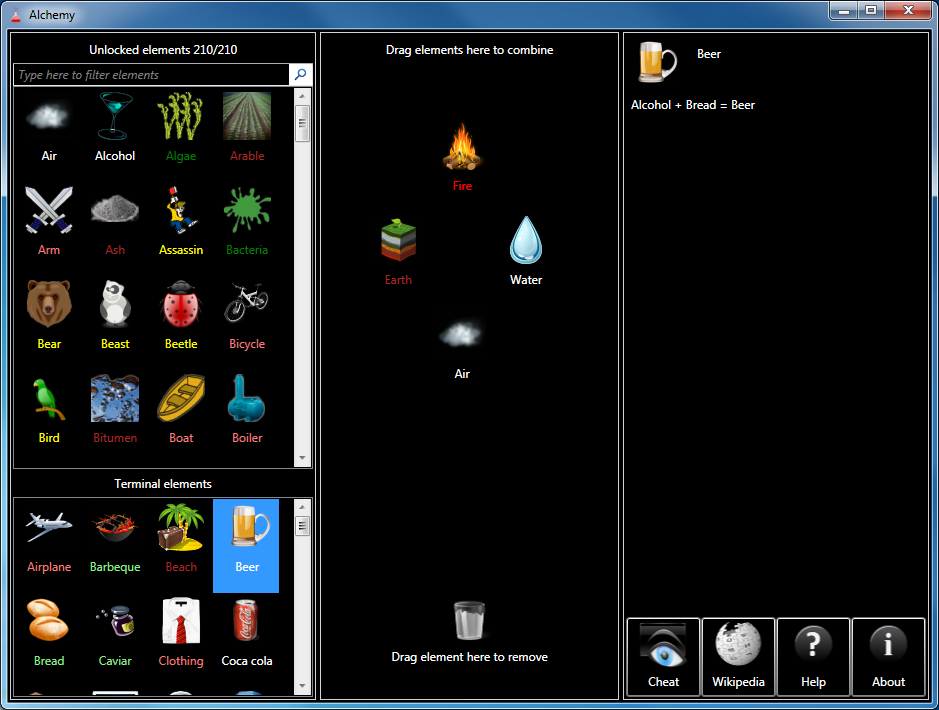
You start with the four basic elements: air, earth, fire and water. You can combine them by dragging onto each other on the central area of the window, “the desktop”. When new elements are created they are added to one of the two lists from the left area. The top list has elements that can be combined again. The bottom list contains terminal elements, i.e. elements that can no longer be combined. You can drag elements from the non-terminals list back to the desktop area, but not from the terminals list.
You can quickly bring onto the desktop the four basic elements by double clicking on an empty area of it. Double clicking on an element from the desktop creates a duplicate of it. You can remove an element from the desktop by dragging it over the trash can icon. You can remove all the elements from the desktop by double clicking on the trash can.
When the number of elements gets too big scrolling through the list might be cumbersome. You can use the search textbox to filter the elements in the list. As you type only the elements that contain the typed text are displayed. It you press the X button of the textbox or clear its content, the list displays again all the unlocked elements.

On the right area of the window you find a help pane. When you select an element from one of the two lists on the left side, you can see a list of all the unlocked combinations in which the elements appears (either as input or output).
There are also several buttons: Cheat, Wikipedia, Help and About. Button Cheat opens a new window that displays the list of all available elements. So if you get stuck and don’t know what elements are left to discover you can cheat and see the list.

Button Wikipedia starts a search on Wikipedia for the currently selected element. Buttons Help and About display information about the game.
Note that your game progress is saved when you close the game and loaded when you start again. The information is stored in a file with your Windows user name and extension .aus. Don’t delete the file or you lose your game progress.
Here is the alphabetical list of all the 210 elements available in version 1.0:
| Air | Cochineal | Gunpowder | Ozone | Soldier |
| Airplane | Coffin | Hippopotamus | Panda | Star |
| Alcohol | Combustion engine | Hourglass | Paper | Starfish |
| Algae | Computer | House | Pearl | Steam |
| Arable | Concrete | Hunter | Penguin | Steam engine |
| Arm | Continent | Hut | Penicillin | Steamer |
| Ash | Corpse | Hydrogen | Perfume | Stone |
| Assassin | Country | Ice | Petroleum | Storm |
| Bacteria | Darth Vader | Jedi | Pie | Sulfur |
| Barbeque | Desert | Kerogen | Pinocchio | Sun |
| Beach | Diamond | Knife | Pizza | Swamp |
| Bear | Dinosaur | Lava | Planet | Tequila |
| Beast | Dough | Library | Plankton | The Beatles |
| Beer | Dragon | Lichen | Plesiosaur | Thunderstorm |
| Beetle | Dragonfly | Life | Poison | Tiger |
| Bicycle | Dust | Light | Poisoned weapon | Time |
| Bird | Earth | Lightbulb | Polar Bear | Tom and Jerry |
| Bitumen | Egg | Lightsaber | Pressure | Tool |
| Boat | Electricity | Lime | Pterosaur | Tornado |
| Boiler | Energy | Limestone | Radar | Tortoise |
| Book | Fern | Livestock | Radio | Transistor |
| Bread | Fire | Lizard | Rain | Tree |
| Brick | Firearm | Locomotive | Rainbow | Turtle |
| Butterfly | Fish | Man | Sand | Uncut diamond |
| Cactus | Fisherman | Manure | Santa claus | Universe |
| Car | Flour | Meat | Scarab | Vodka |
| Carbon dioxide | Flower | Metal | Scientist | Volcano |
| Carmine | Flu | Milk | Scissors | Wagon |
| Cat | Fly | Mite | Scorpion | Warrior |
| Caviar | Fondue | Mold | Seed | Water |
| Cement | Forest | Monkey | Shark | Watermelon |
| Cheese | Fossil | Moon | Shell | Whale |
| Chicken | Fruit | Moss | Silicon | Wheat |
| Chip | Fugu | Motorboat | Sith | Wheel |
| Christmas tree | Galaxy | Motorcycle | Sky | Wind |
| City | Gasoline | Mouse | Skyscraper | Wine |
| Clay | Geyser | Mud | Snail | Wood |
| Cloth | Ghost | Mushroom | Snake | Wooden ship |
| Clothing | Glass | Ocean | Snow | Wool |
| Cloud | Grape | Old man | Snowman | Worm |
| Coal | Grass | Omelette | Soda water | Yeast |
| Coca cola | Grove | Oxygen | Solar system | Yogurt |
Note: In order to run the game you need .NET framework 3.5 SP1.
Stay tuned, updates with more elements are coming!
Update: Download the latest version from here.
P.S. 2: “Whale” in Italian should translate as “Balena”. “Orca” is a “Killer-whale”.
Will try to look at this error on Win XP and see if I can reproduce. And thanks for the Italian correction. Looks like we have the same word in Italian and Romanian for Whale, Balena. 😉
I understand simple. Does this game run on Windows 7? Will Microsoft .Net Frame 4 Client Profile work?
How big is the download file? Thanks!
Yes, it runs on every version of Windows where you can install .NET 3.5 SP1 or above. The download file is a little bit over 2MB.
Trying to figure out Cat from Mouse is driving me insanely mad. lol
got it lol
I tried twice to install but it fails immediately. Downloaded to computer, clicked on exe file, got popup box for instructions, clicked on run (the only choice) and then another popup reading “Alchemy stopped running”. Did it on both Windows 7 and Vista Home Premium.
Why isn’t this like the android app?
and where are the cheats like the formula?
Because it is not the Android app? Only inspired from it?
You should unzip it to a local folder and run it. Don’t try to run it directly from the zip (though that should work too). And you need .NET framework 3.5 SP1 installed on your machine.
@Bob: You’ll find cheats to both implementation at the wiki.
Is there a way to clear the work area without dragging the elements to the trash one by one? I did this by accident once but have not been able to do it again.
Yes, there is a method, and it’s documented here https://mariusbancila.ro/blog/games/alchemy/. Just double click on the trash bin. You can also hold the control key and select some elements to delete, and the press Delete key to remove them from the desktop area.
Marius, thanks for all your hard work on this. We have a little girl who used to keep stealing my Android phone so she could play that version. It’s therefore wonderful to have a version she can play on her netbook!
One problem, though. The screen she runs on is natively 1024 x 600 (small netbook screen). I’ve set the shortcut to the game to ensure it always runs maximised and when it is run it looks fine.
Shortly after starting, however, the screen seems to “stretch” vertically and all the buttons, the waste basket and so on disappear. The only way to get them back is to close the program and run it again.
Any thoughts?
This has been so far the most reported “bug”. However, it’s actually a feature, because it’s been implemented this way. I understand that people would like to play it on notebooks with small screen resolutions, but unfortunately for them I don’t have the time now to make it happen. Maybe in a few months, but I’m sure that won’t help you for now. Sorry about that.
Hi maruis
i would like to translate alchemy to Hebrew
if you think this is a good idea i would be happy to do it Voluntary
please contact me
Hey Marius, I try to make the life with energy and swamp but I can’t
No, that doesn’t work, because life did not appear in the swamps, isn’t it? It was another environment where life appeared.
Hi there, i’ve been addicted to the game.. but.. cant seem to find Tomb raider.. 😡 I’ve tried the hint button.. but.. nothing so far 😐
Any other hint please?
Tomb is the synonym for…? And Tomb Raider is a computer game.
How create Radio from Transistor?
This element might not be that easy; radio waves travel through…
I downloaded this game to try out as it looked interesting… I DL’d the newest version but when I tried to extract or run it the msg windows ‘experienced a problem and needs to close the program…
Doesn’t even begin to run… I’m running XP – SP3
any hints to getting this going??
Thx
My bad… Some days I can be soooo DUH!!! sorry…
I love your game but alot of the elements wo’nt work for me
and some elements are wrong
Well, all elements do work; many people have completed the game, so all the combinations are correct. As for some elements being “wrong”, well, you’d have to define wrong and give some examples. Though I admit, of course, that not all the combinations are straight forward, and some will require some context knowledge, such as computer games, or sports.
Hi, love the game, but really stuck on sugar and team. Any help please.
Before you can make sugar, you need sugar cane. Than just combine with something you probably used with many other elements before. As for team, it’s not straight forward, but think the Mario games and try to combine elements that are related to that.
Im having a real problem making arable i keep useing the hints but there are so many elements left that arable has not been one of the sugestions. Im kinda curious if it is still an element or if u changed its name or something because the android cheat for arable makes farm on the windows version if that makes sense lol
My game does not use the same combinations as the game on Android. They are different games. Well, to make arable, think of what makes the soil (earth) arable… It’s pretty easy, IMO.
Hi Marius,
Your game is great!! Can you, please, give a hint for plutonium, It was hard to find Uranium because this one is usually from metal but I’m blocking on Plutonium…
Well, plutonium is obviously obtain from Uranium, but only some ‘specialized’ people know how to make it.
can you please help me to find the computer?
nvr mnd
I have a suggestion for more star wars related combanations. Who would I contact?
You can drop them in a comment here. Nobody will see them, since I have to approve the comments.
Hi, i am having real trouble with playing the game, the file downloads and unzips fine, but when started nothing happens, i have checked in the task manager and the .exe is running but apart from that no other evidence than that that it is running (apart from other things being slower) i have installed the latest .NET 4 and have windows 7, any suggestions?
This game was built with .NET 3.5 SP1. I don’t actually have a machine with only .NET 4.0 installed, but I guess it should work though. But you could try also installing .NET 3.5 SP1.
i’m very addicted to that game but got already all 444 elements… i hope there will be a update soon?! 😉
thank you very much for that game!
Updates are possible, but can’t give any dates.
First a great compliment for the game. Very nicely done.
I have some comments regarding the german translation. A few elements are translated with missleading or just wrong expressions. If you do a patch you may add these changes:
english – german
american football – “American Football”
poisoned weapon – “vergiftete Waffe”
diet – “Diät”
leech – “Blutegel”
infestation – “Verseuchung” or “Seuche”
Terran – “Terraner”
all others are very well translated.
I’ll give some comments regarding the creation of certain elements next time.
All right, thank you for pointing that. I’ll fix the translation for the next update.
I am having difficulties with Uranium. I now know that Uranium is a radiactive metal used in nuclear weapons, that can be found in rocks and is formed in supernovas. I have tried all the possible combinations, but no success.
Can you help me?
Great game!
If you know it’s radioactive and it can be found in rocks then you have all the info you need to make Uranium.
Thank you Marius for an awesome version of Alchemy. Enough of the element combinations are different to make it interesting. I have a questions about the hints function. It has only shown two, Ghost from Life and Bird from Air. At the moment I stuck on Man (among other but its my priority) I’m running Ver 2.0.5 on Windows 7 w/ .Net 4 Extended. Any suggestions? Thanks again.
Hints work the following way: they show you an element you can create from an existing one (the second you’ll have to discover yourself). If you have elements on the desktop (the combination area) and new elements can be created from them, the hints window always use that first. Otherwise, it looks in the list of all the other elements to see what can be unlocked.
To unlock Man you have to think in terms of evolution.
Hello again,
I think it would be cool to add a feature to see the number of possible equations, not just elements, and to add a little sign to an element if it has been used in every possible equation. So that the final phase of the game is not so hard.
For example “the beatles” are not a terminal element although I havent used it in any equation and I have all elements. Same with VW beatle or ball.
Also some Ideas for certain elements:
—-Spoiler Warning—-
Scientist+Metal = Alchemist ? This seems a little like reverse evolution.
Insect+Air = Mosquito ? This took me very very long to get. I think for most poeple it will make more sense to combine Insect and Blood or Vampire or Leech to get Mosquito.
Leech+King = Lich King ? What does a leech have to do with a lich? I would suggest Zombie or Corpse with King.
Also some minor comments:
Alien should be made from life + galaxy and life + universe.
Brick and Water gives Dam. All the Dams I know are made from concrete, so this should definetly be added, not neccessarily changed.
Suggestions for adding new elements:
It would be so cool to have yoda by combining jedi and swamp.
One could add sunflower by combining (suprise surprise) sun and flower. and with sunflower u could produce oil by combining with pressure.
Also it might be nice to add woman and child. Woman could be done with perfume and diamonds. man and woman would give child, which could make pupil and school in combination with library.
pupil with yoda might then lead to luke skywalker, which might also be made by adding darth vader to child.
Sounds like fun, doesent it?
Thanks for the comments. Will take them into consideration for the update after the next one (which is already done, but will take a bit before publishing).
Great game! Surprised that it has Indonesian language. Works well in win7 with touch-screen Thanks a lot!